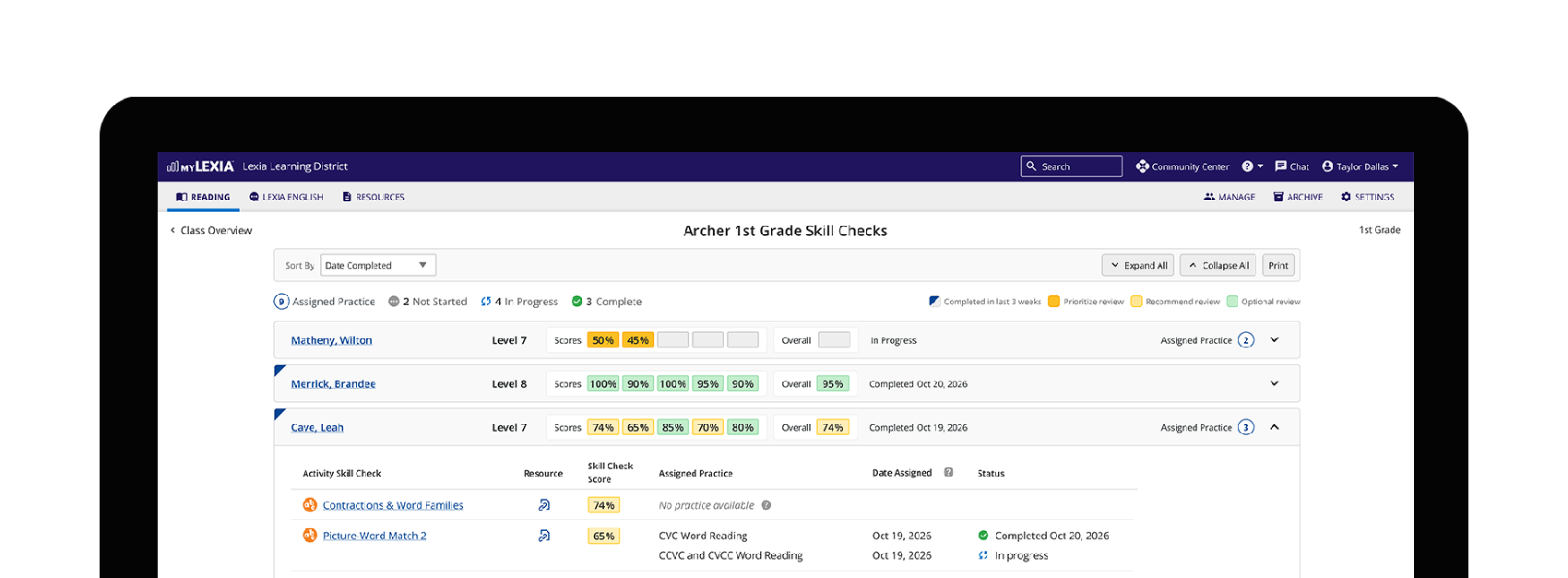
Skill Checks Reports
Reports and insight on student performance for teachers at Lexia Learning
Our teachers had a problem
Lexia Learning (https://www.lexialearning.com/) is a comprehensive suite of education products aimed at improving literacy for Pre-K–12 students, built on fresh research and the science of reading. Their Core5 program aims to close reading skill gaps for Pre-K–5 students, and skill checks—a series of 5 activities in a unit—are a part of that journey. In 2025, the content team began work on practice to support students struggling with specific skills in activities.
myLexia collates reports on students, classes, and districts using Core5 and other Lexia products, but skill checks didn’t have a report. There was no way to see which students were assigned practice, much less a class’s strengths and weaknesses. At this point, Core5 teachers swam upstream against state-assigned testing targets and lost time teaching all skills in a unit instead of focusing on specific needs.

Core5 teachers swam upstream against state-assigned testing targets and lost time teaching all skills in a unit instead of focusing on specific needs.
Setting the scope
In late 2025, the director of educator UX asked me to step in and explore how teachers could use skill checks to identify students who needed help with specific skills and focus their lesson plans.
Role:
I led the design direction, including presentations.
My output included journey maps, user flows, wireframes, prototypes, teacher usability tests, and new components.
Every week, we held a cross-functional team meeting and aligned on our next goals. I spoke about our research, key takeaways, and user experience direction.
My UX design cohorts supported copywriting decisions and component integration as the design system underwent significant Angular updates at the time. Content provided names and context for the new Activities. User research synthesized internal feedback and provided interview questions to accompany the teacher usability tests.
Constraints:
I had 2 months to deliver final designs.
Lexia wanted the new Skill Checks reports released in time for the upcoming school year, about 5 months out. Since this project coincided with converting myLexia from a legacy platform to Angular Material, I thought ahead.
I shaped the MVP based on the two-month timeline and the following needs:
The content team required the MVP to include teacher resource links for each skill and identify which language teachers responded to best around Practice.
I also needed to design how Skill Checks without Practice would behave, since teachers were unfamiliar with Practice and unaware that new ones were being added.
We didn’t have the engineering capacity to implement live student updates, so I needed to explore what teachers expected when they refreshed a report.
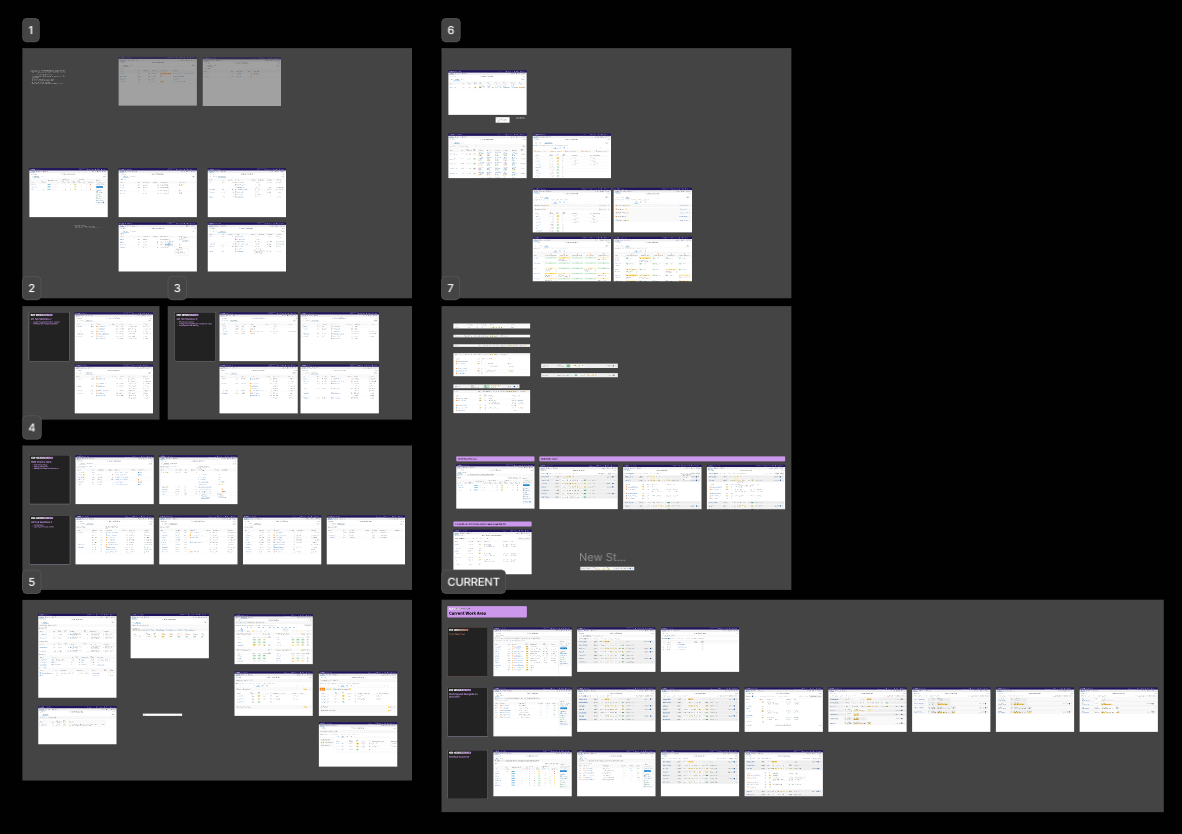
Low-fidelity exploration and iterations

Lexia’s Class Overview, including the new Skill Checks Report.
Making key decisions
I knew we needed to make practice visible for teachers, and it was just a matter of choosing the best path. What could I do that gave teachers the insight they needed and supported Lexia’s feature goals?
Decision 1:
Create a new report pattern
I started my work by reviewing existing report patterns to see whether we could integrate skill checks with what we already had.
I soon realized teachers would benefit from multiple levels: comparing students in a class, digging into one student’s performance, then comparing how other students performed on the same skill. Our other reports didn’t offer that functionality at the classroom level. Building a new report pattern meant new components and interactions, but we had capacity to craft something that exceeded teacher expectations.
Decision 2:
Reports now, insights next, then manual assignments later
When our teams first met, I recorded the internal team's asks for this project: show who has what practice activities, let teachers manually assign practice, and provide AI/ML insights based on classroom and student performance.
Engineering and design could support only one of these asks for this release, and I knew practice wouldn’t have a home without a skill checks report. I placed insights in the next update, based on the progress we’d made with teaching tips on another product. Finally, I pinned manual assignment after practice and insights, hoping to collect feedback on how teachers might use it.
Decision 3:
Integrate teacher feedback
I validated my designs with 10 teachers over 2 weeks, generating a new interactive prototype every 2 sessions. Teachers appreciated the new reports, and I had a few notable takeaways from our sessions:
Reinforce the hierarchy
The first major change was improving the visual hierarchy: skill checks include activities, and low activity scores trigger practice. I ensured further iterations flowed from skill checks to activities to practice, highlighting how the new content fit in the stack.

Improve color coding
I also experimented with green-to-red color-coding for skill check scores. Teachers noted the colors were helpful, but red felt too alarming and negative, since the scores weren’t final grades. I changed red to a saturated orange during the tests, and future interviewees complimented the updated scale.
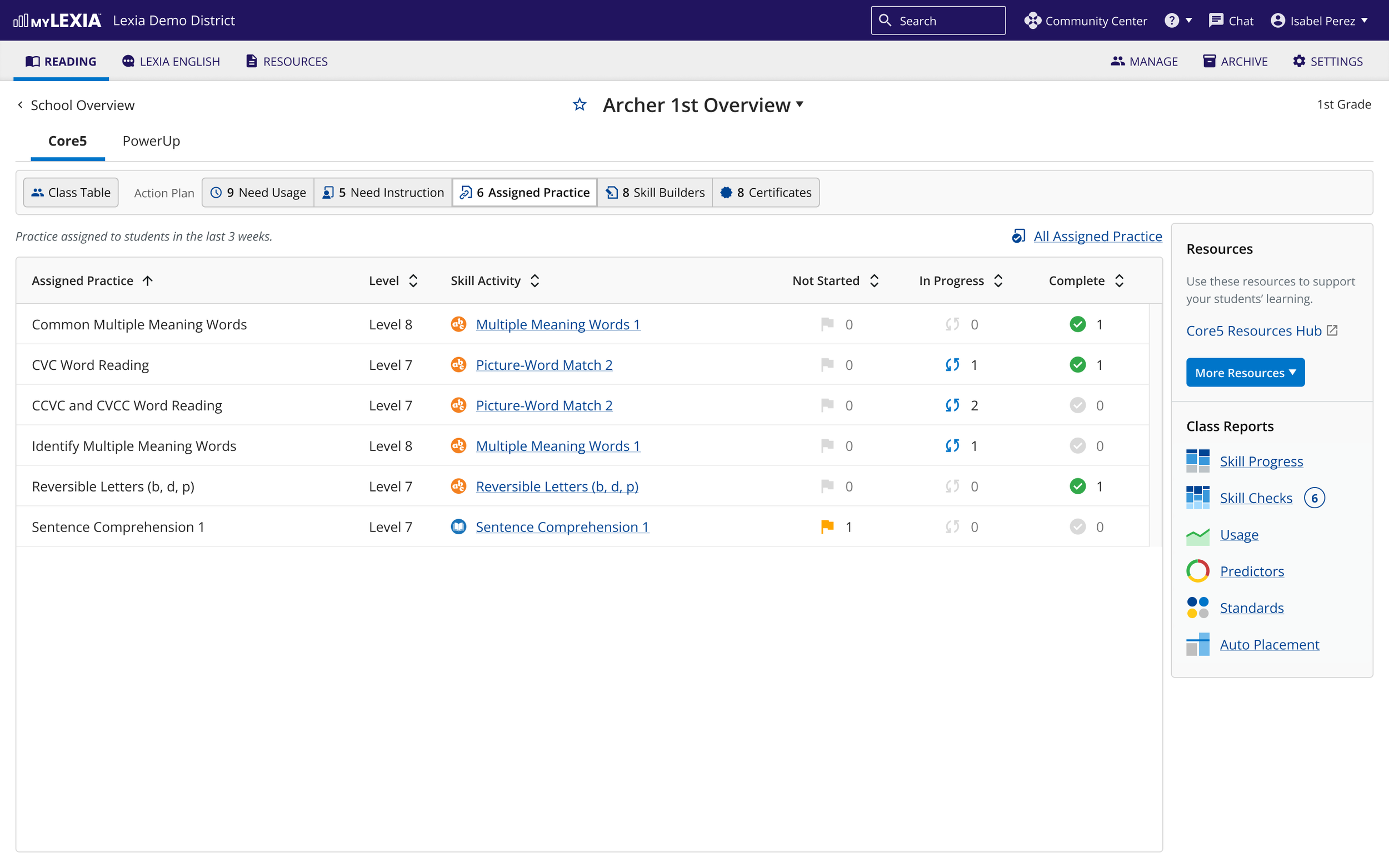
Make an “action plan” plan
Finally, 4 teachers said they wanted to manage practice in the Class Overview Action Plan. This was the feedback I needed to shape manual assignments, and it allowed me to use space previously reserved for actions on the main skill checks report.
Skill Checks Report
1: Typical data | 2: New “Practice” and “Status” states in medium viewport | 3: No data
Activity Report
1: Students with assigned practice for activity (default) | 2: All students who have completed the activity | 3: Medium viewport

I helped teachers see the students that needed them most.
Teachers loved having a class report on skill checks that showed students, their most recent scores, and any assigned practice, highlighting struggling students at a glance.
Outcomes
I was thrilled to hear we made a difference in our teachers’ lives with these reports. I immediately highlighted what worked, as well as how we could make it work even better with tips and student groups.
Teachers Loved It:
Skill checks became a touchpoint for Core5 teachers, who often worked with students needing extra attention.
They loved having a class report on skill checks that showed students, their most recent scores, and any assigned practice, highlighting struggling students at a glance.
They appreciated the automatically assigned practice for students with low scores, which reduced time spent teaching skills students have already mastered.
They noted that seeing which students had practice for a specific activity helped them build study groups and spot possible mentors.
Future Forward:
Teachers also let us know what they’d like to see next.
After speaking with our users, I allotted time after the summer to implement live student score updates for proactive lesson planning during class.
3 of the teachers also wanted context-sensitive recommendations for teaching skills that students consistently struggled with.
The manual assignment feature turned out to be a lower priority than initially assumed, so—based on previous insights—I turned toward how teachers might build student groups with the new reports.